
Description
One person signs up the whole family or team on a page you build with Elementor. Every guest gets their own QR ticket and six-digit code by email. On the day, your helpers scan the tickets with any phone, and one tap checks in a whole group and takes what they owe.
- Unlimited events, guests and sign-ups. Run as many events at once as you like. No limit on people, ever.
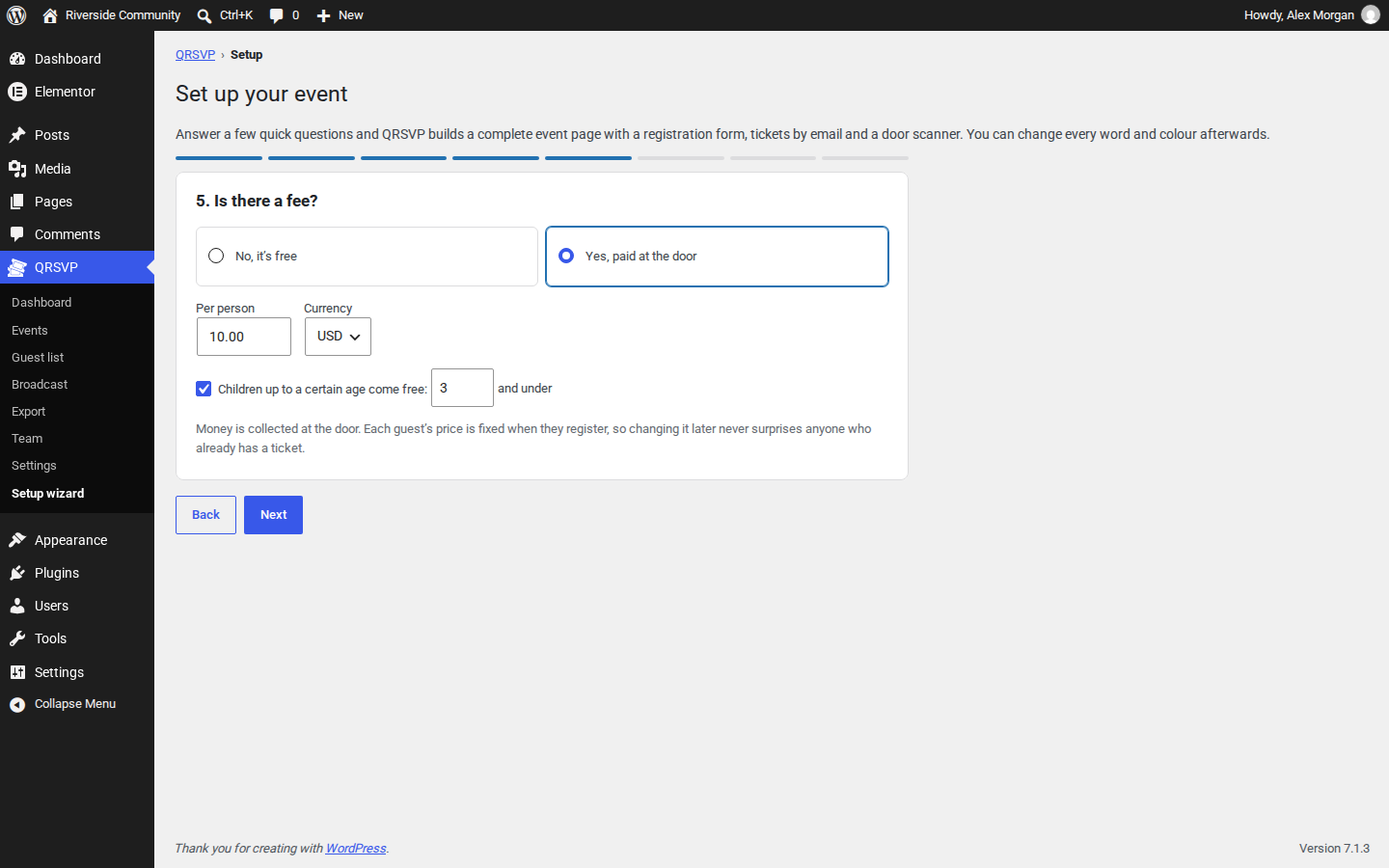
- A setup wizard: answer a few questions and get a complete event page, on any theme. It can add the event’s own legal page templates, make the page your home page and put it in your main menu. Nothing you typed is lost if something needs fixing, and an event from 6 pm to midnight just works.
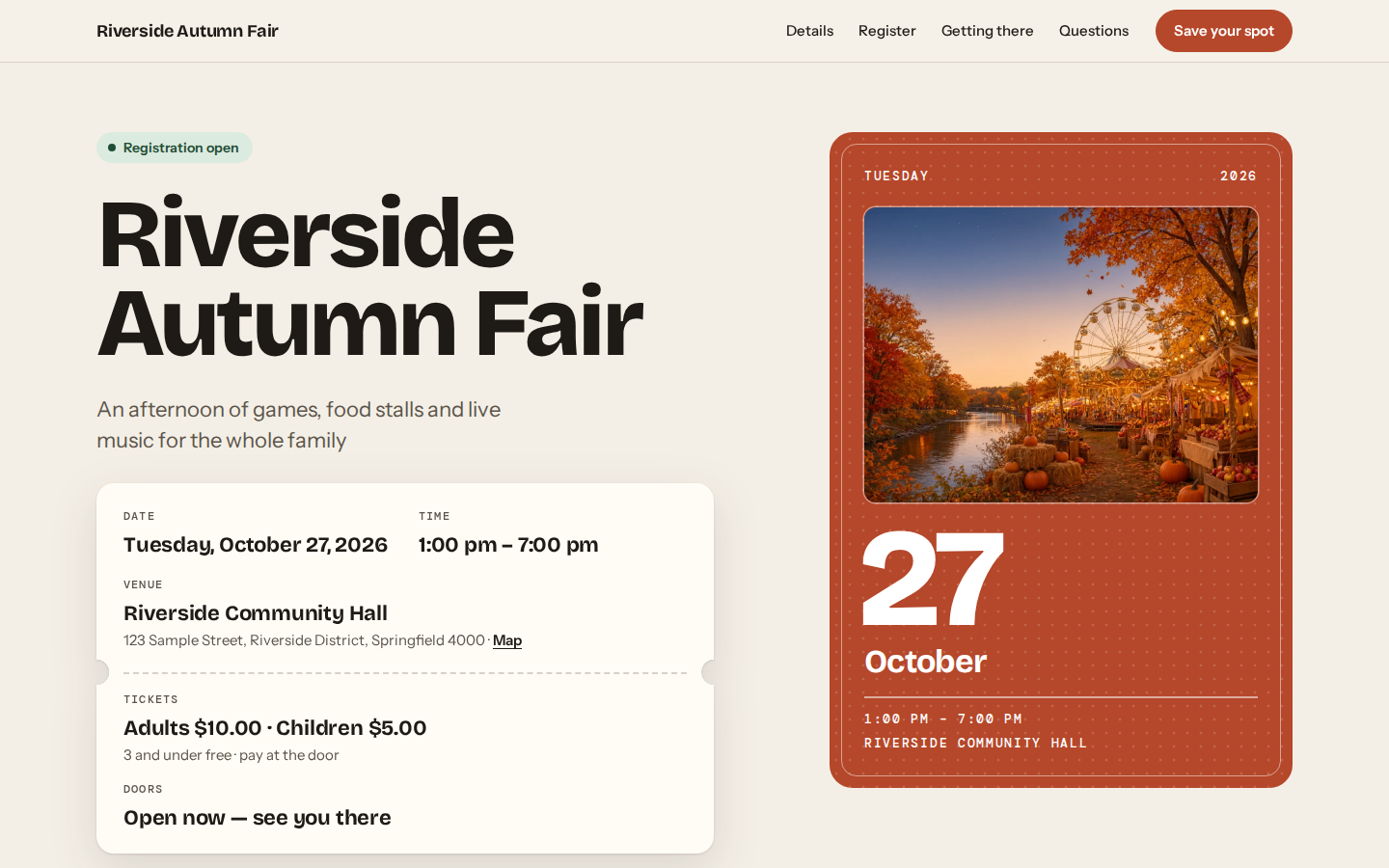
- Eleven Elementor widgets: event header, event hero, sign-up form, event details, map, countdown, places left, questions, ticket, booking and check-in scanner. They follow your Global Colors and Fonts, and change with the event: “Only 3 places left”, “Registration closed”, “This event has ended”.
- A short link and a QR code to share every event: put
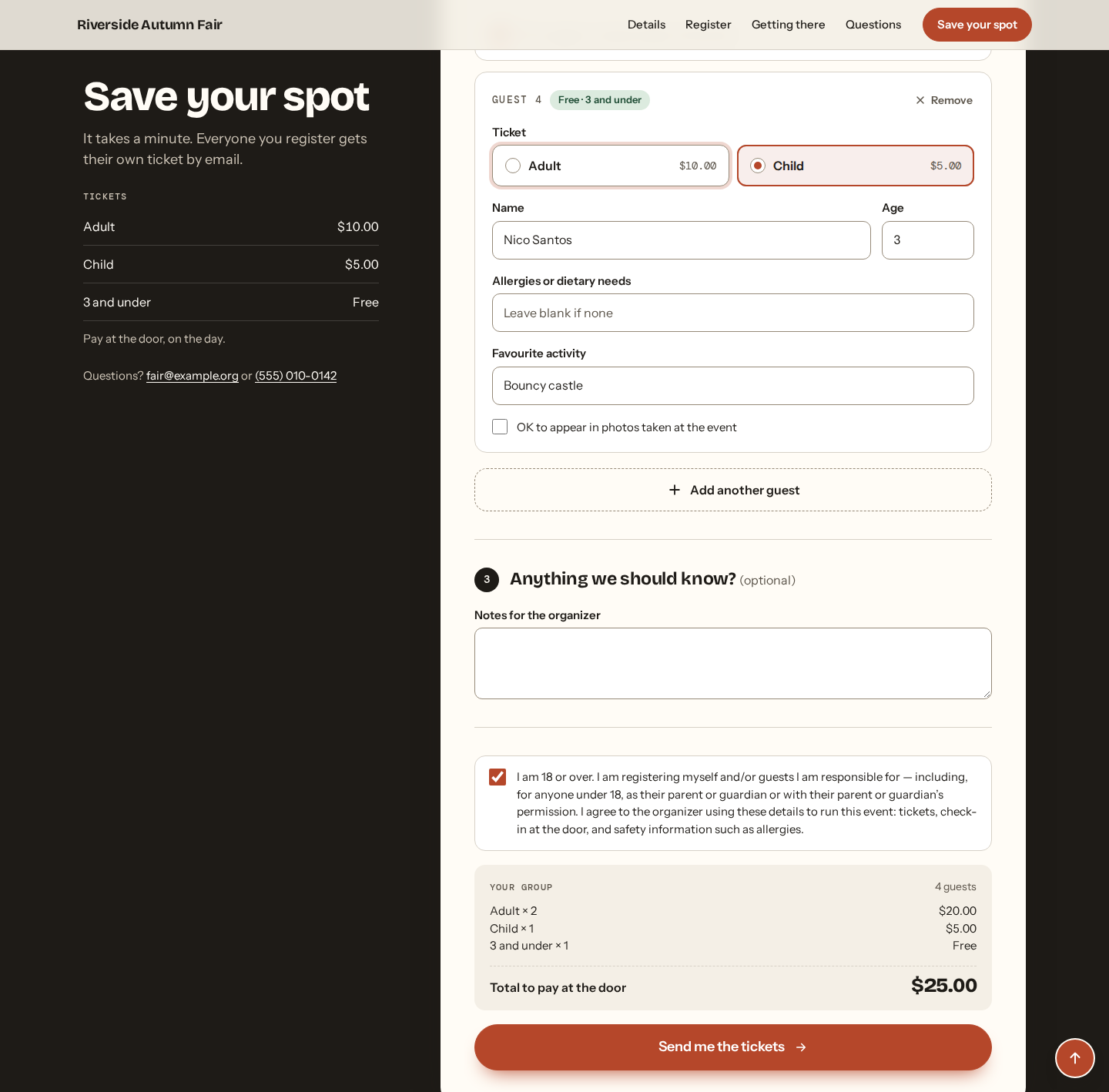
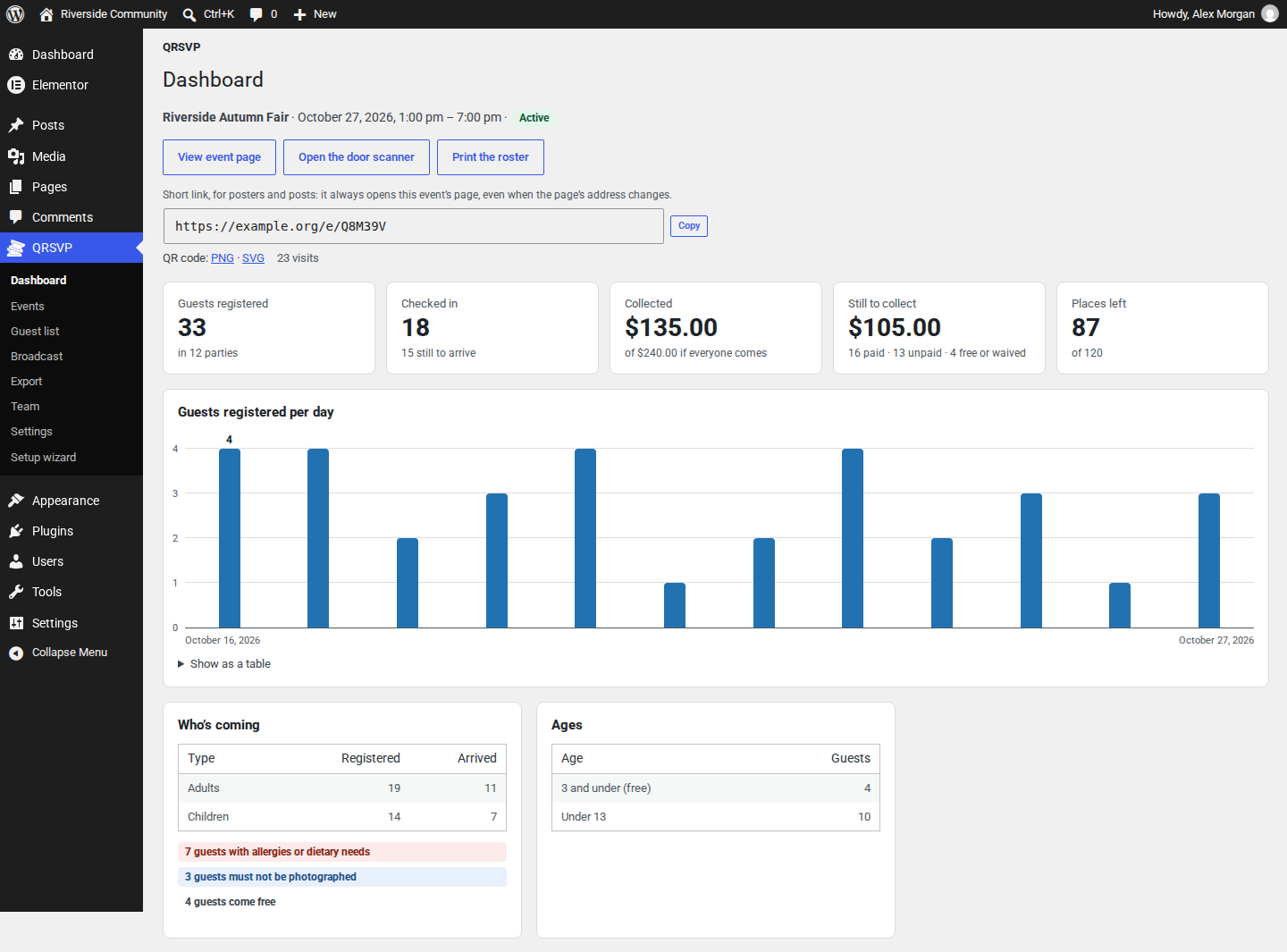
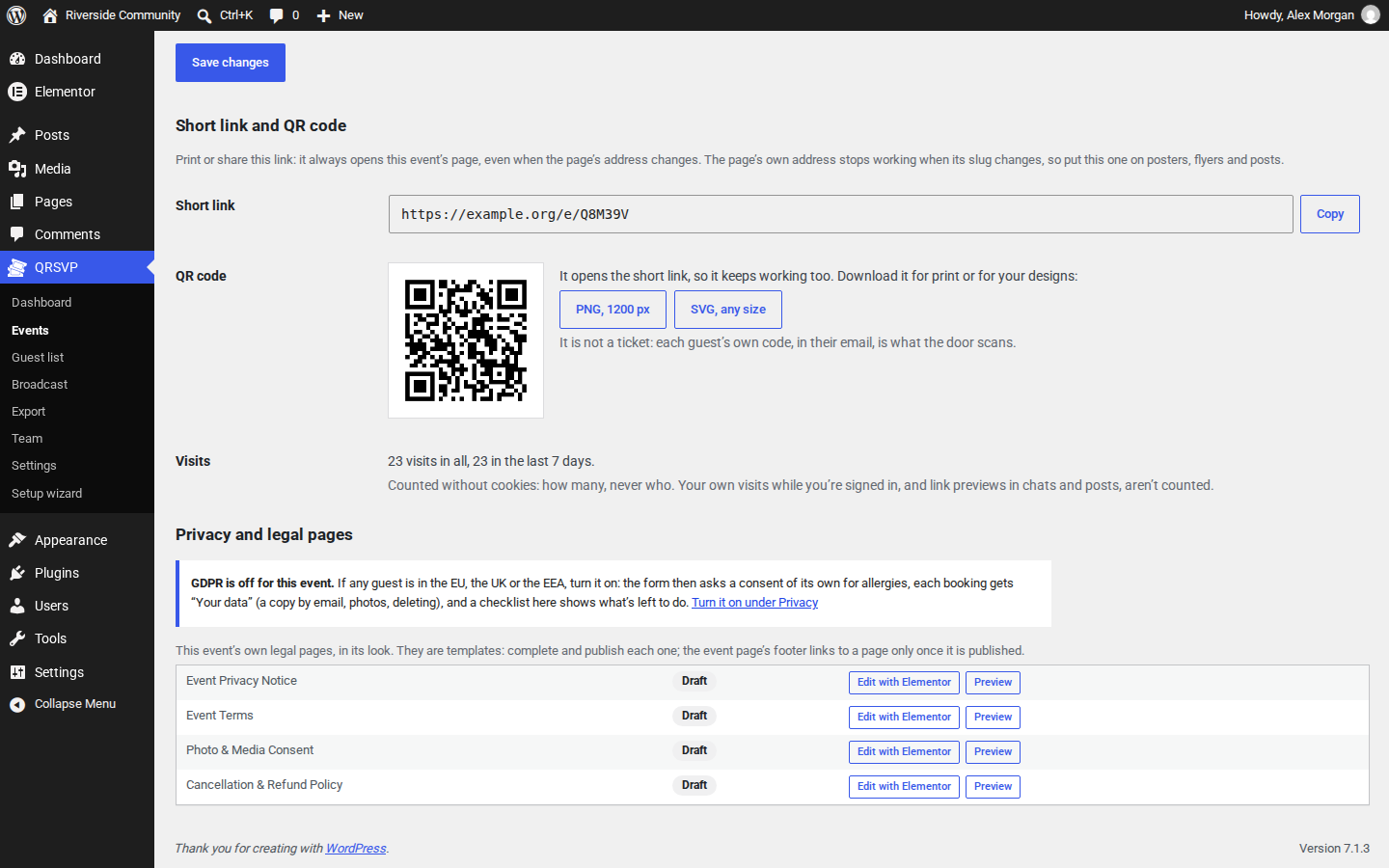
yoursite.com/e/K7PM4Qin invitations, messages, posts and newsletters, and print the event’s QR code on posters and flyers. Both open the event’s page, where people sign up, even after the page’s address changes. Copy the link and download the QR code (PNG, or SVG for any size) from QRSVP’s Dashboard. Visits are counted without cookies: how many, never who. - A sign-up form that does the sums: ticket types with their own prices, children under an age you choose free, a live total and a limit on places. It asks about allergies, photo consent and an emergency contact only if you want it to, and closes itself when the event is full or over.
- Each booking has its own link: no account or password. Guests open their tickets there, add the event to their calendar, and cancel a place they can’t use.
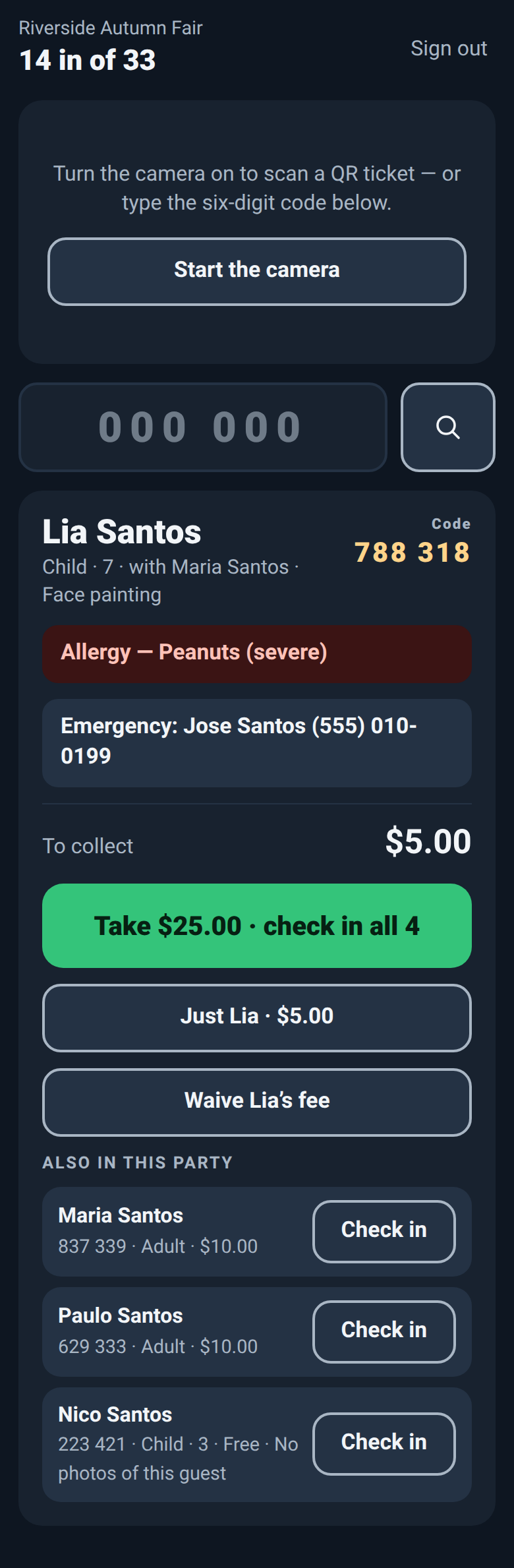
- Check-in with any phone, no app: scan the QR code with the camera or type the six-digit code. One tap checks in a whole group. Allergy and no-photo warnings come first. Add the check-in page to the phone’s home screen.
- Money at the door, tracked properly: prices are fixed when people sign up, two phones never take the same payment twice, and a check-in can be undone. Each group’s page lists every payment: when, how much, and who took it.
- Emails that arrive: QR tickets as embedded images, a plain-text part, sent with wp_mail, so any SMTP plugin works. Or give QRSVP’s emails an SMTP account of their own.
- Tools for organizers: a dashboard with every event (sign-ups, check-ins, money taken and still to collect, places left), the guest list, each group’s page, an email to everyone or only to those who still owe, and a spreadsheet export. Copy an event to start the next one.
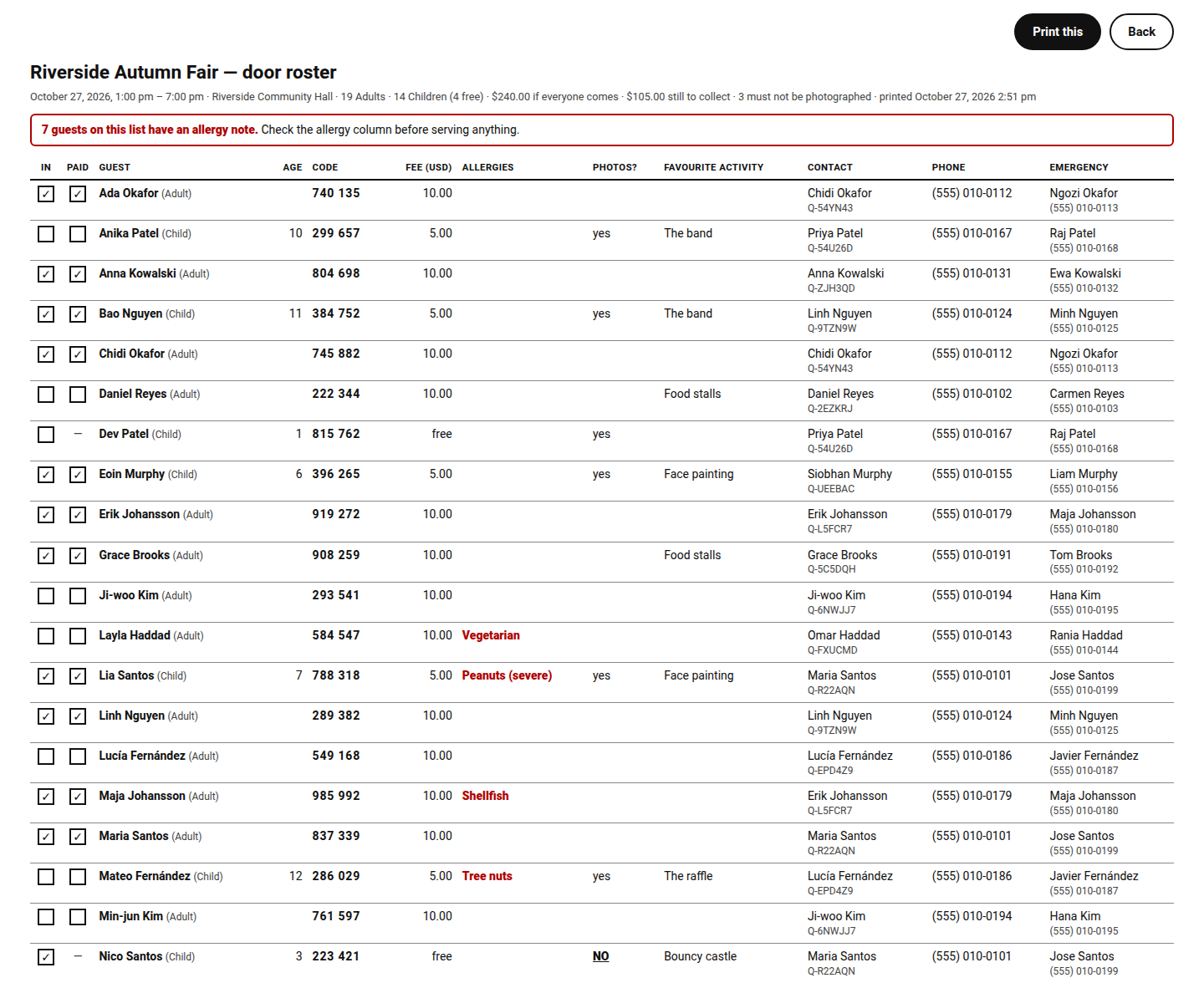
- A printable list for the door: every guest in name order, with boxes to tick for in and paid, their code, fee, allergies and photo consent, and who booked them. If the Wi-Fi fails, check guests in on paper.
- Your team, event by event: give helpers the Door Staff or Event Manager role, and choose which events each one may work on. They only ever see, scan or export those.
- Drafts: get the next event ready while this one runs. Its page stays hidden from visitors, menus and search until you activate it.
- Each event, its own pages: legal pages in the event’s look, with its header and footer, at addresses under the event page’s own; a contact email and phone number wherever guests are told who to ask; the event page as your home page or in your menu, switchable any time.
- Privacy: sensitive details are for organizers only. WordPress’s personal data export and erase include QRSVP, and guest data can delete itself after the event.
- Built for GDPR, event by event: turn it on for an event whose guests are in the EU, the UK or the EEA. Its privacy notice fills in your details and keeps them up to date; allergies get a consent of their own; guests have a copy of their data emailed to them, withdraw photo consent, or delete their booking and its data from their booking’s link; and a checklist shows what’s left. You stay responsible for your guests’ data: QRSVP gives you the tools, and its templates are not legal advice.
- For developers: actions and filters for add-ons, and WP-CLI commands (
wp qrsvp events,wp qrsvp stats,wp qrsvp purge).
QRSVP Pro, a separate plugin, adds eight event themes, your own questions on the form, a waitlist when an event is full, reminder emails with the tickets, and Insights, to see how each event is going.
Add-ons are small separate plugins that need only QRSVP:
- QRSVP Payment with PayPal: guests pay online when they sign up, or at the door.
- QRSVP Chat Button: guests call, email or chat with you before they sign up.
- QRSVP PWA for Door Staff: your helpers’ phones, set up in a minute, with no passwords.
Privacy
QRSVP stores what people enter when they sign up (contact details, and for each guest: name, optional age, allergies, notes, photo consent), the time and wording of the consent they gave (at an event that follows GDPR, the allergies’ own consent too), and their IP address and browser, to run the event. Visits to an event’s short link are only counted, by day and by where they came from; nothing about the visitor is kept. QRSVP itself sends nothing to other servers and sets no cookies; the map and the fonts below are the only parts of an event page that load from elsewhere. Suggested privacy policy text is added under Settings Privacy.
External services
Google Maps (the Event Map widget)
The Event Map widget shows the venue on a Google map. By default the map loads only when the visitor clicks “Show the map”, and the page says first that showing it shares their IP address with Google. If the organizer turns that switch off, the map loads with the page.
- What is sent, and when: when the map is shown, the venue’s name and address (they are in the map’s address) and, as with any embedded page, the visitor’s IP address and browser details.
- Provider: Google LLC. Terms of service: https://policies.google.com/terms and https://maps.google.com/help/terms_maps/ . Privacy policy: https://policies.google.com/privacy
The “Get directions” button is a plain link to Google Maps: nothing is sent unless the visitor clicks it.
Google Fonts (through Elementor)
The starter event page’s fonts are Google Fonts, which Elementor loads, unless you turn on Elementor’s “Load Google Fonts Locally” setting to serve them from your own site.
- What is sent, and when: when a page with those fonts loads, the visitor’s IP address and browser details.
- Provider: Google LLC. Terms of service: https://policies.google.com/terms . Privacy policy: https://policies.google.com/privacy
Third-party libraries
- chillerlan/php-qrcode 6.0.1 (MIT or Apache-2.0) — https://github.com/chillerlan/php-qrcode
- chillerlan/php-settings-container 3.3.0 (MIT) — https://github.com/chillerlan/php-settings-container
- html5-qrcode (Apache-2.0) — https://github.com/mebjas/html5-qrcode — the human-readable source of the minified file in assets/vendor is at that address.
QR Code is a registered trademark of DENSO WAVE INCORPORATED. Elementor is a trademark of Elementor Ltd.; QRSVP is made for Elementor by MERAF Digital Solutions, and is not made or endorsed by Elementor.
Screenshots


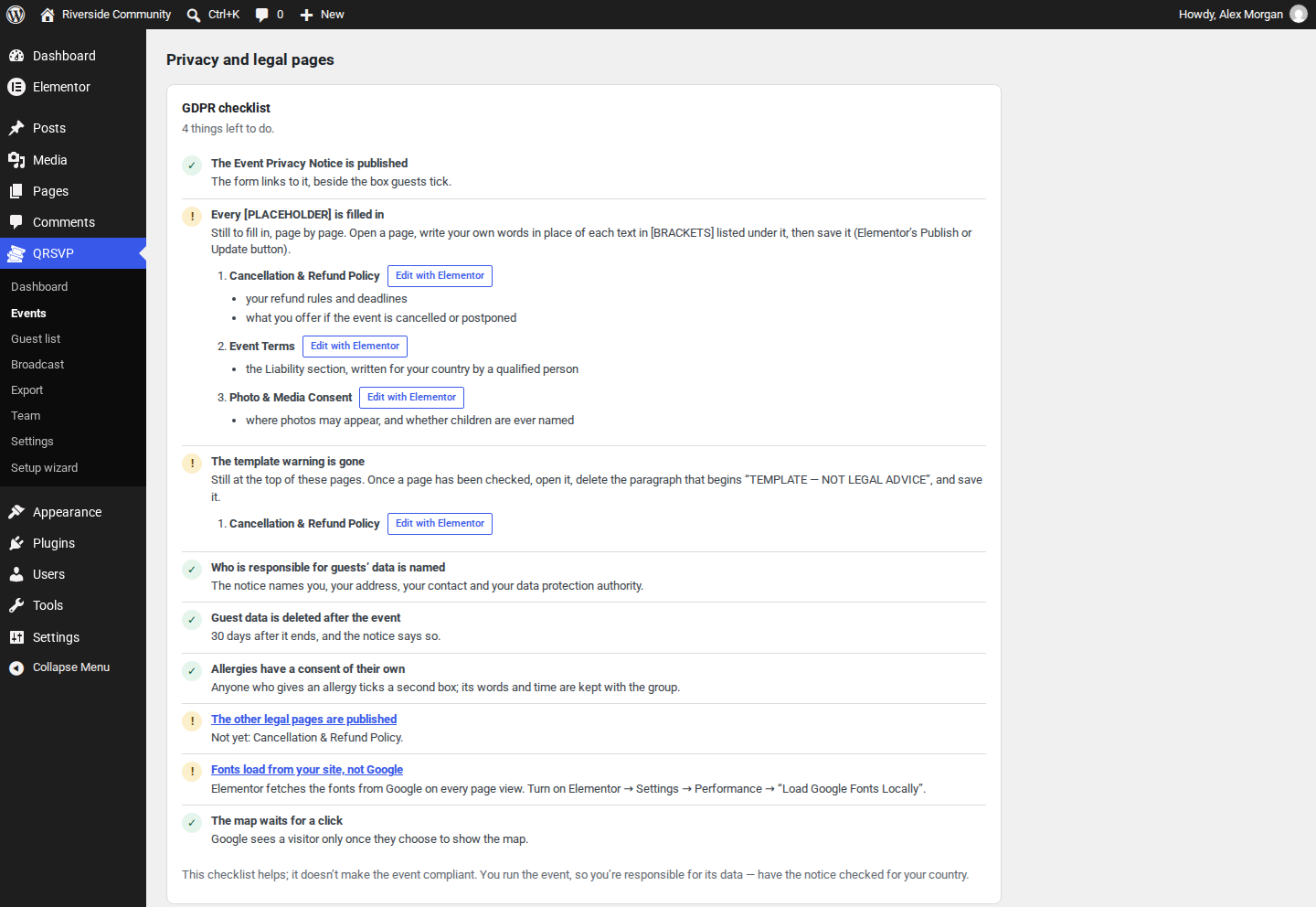
Installation
- Install and activate Elementor.
- Install and activate QRSVP. The setup wizard opens.
- Answer the questions. Then fill in anything in [BRACKETS], and publish the event’s legal page templates once they are reviewed.
- Share the event’s short link or QR code from QRSVP’s Dashboard.
FAQ
-
Is there a guest limit?
-
No. The free plugin has unlimited guests, sign-ups and events.
-
Can guests pay online?
-
Yes, with QRSVP Payment with PayPal, a paid add-on that needs only this free plugin. Guests pay with a PayPal account or a card, right after signing up or later from their booking, or at the door as before. The money goes straight to your own PayPal account, and QRSVP takes nothing. PayPal is the only payment service it works with.
Without the add-on, guests pay at the door, and QRSVP tracks what each one owes and what was taken. Each group’s page lists every payment, with who took it.
-
Do I need Elementor Pro?
-
No. The free Elementor is enough. The event page uses Elementor’s Canvas template, so it looks the same under any theme.
-
Every event has a short link, such as
yoursite.com/e/K7PM4Q, and a QR code that opens it. Both are on QRSVP’s Dashboard, with a Copy button, and under Events Edit Short link and QR code. Put the link in invitations, messages and posts, and print the QR code on posters and flyers: the PNG is 1,200 pixels wide, and the SVG prints sharp at any size. Both keep working if you change the event page’s address. The event’s QR code is not a ticket: each guest’s ticket has its own. -
Do guests need an account or an app?
-
No. Guests sign up on the event page, and their tickets arrive by email with a link to their booking. Helpers check them in from the check-in page in their phone’s browser.
-
What if the Wi-Fi fails at the door?
-
Print the list before the event: QRSVP Export Open the roster. It has every guest in name order with boxes to tick for in and paid, their code, fee and allergies. The check-in page itself needs a connection.
-
Can more than one event run at the same time?
-
Yes, as many as you like. Each event has its own page, guest list and check-in, and you choose which events each helper works on (QRSVP Team). Get an event ready as a draft first if you like: its page stays hidden from visitors until you activate it.
-
Does QRSVP show ads?
-
Never on your site, in your emails or on the check-in page. In wp-admin, people who can install plugins see QRSVP Pro mentioned in a few places: a “Get QRSVP Pro” link on the Plugins screen and in the QRSVP menu, a bar on QRSVP’s own screens that closes for good, and short notes where QRSVP Pro would add something — on the event screen, beside a full event, where an event’s look is chosen, and in the Event Hero widget. To hide them all, add
add_filter( 'qrsvp_show_upgrade_prompts', '__return_false' );to your site. The free plugin is complete without QRSVP Pro. -
Can a door volunteer see the guest list?
-
No. The QRSVP Door Staff role opens only the check-in page. Under QRSVP Team you also choose which events each person may work on.
-
Will the wizard change my site’s colours?
-
Only if you choose to. On a site that already has its own Elementor colours, it keeps them. It saves a copy of your Site Settings first, and you can restore them in one click.
-
Are the legal pages ready to publish?
-
No. They are templates with [PLACEHOLDERS], not legal advice, and they are created as drafts. Have them reviewed for your country. Your details — who is responsible for the data, your address and contact, your data protection authority, how long data is kept — fill themselves in from the event’s Privacy settings.
-
Does QRSVP make my event GDPR compliant?
-
No plugin can: you run the event, so you decide how your guests’ data is used. QRSVP gives each event the tools — a privacy notice with your details, a consent of its own for allergies, guests managing their own data from their booking, deletion after the event — and a checklist of what’s left.
Reviews
There are no reviews for this plugin.
Contributors & Developers
“QRSVP – Event RSVP & QR Check-in for Elementor” is open source software. The following people have contributed to this plugin.
Contributors
Translate “QRSVP – Event RSVP & QR Check-in for Elementor” into your language.
Interested in development?
Browse the code, check out the SVN repository, or subscribe to the development log by RSS.
Changelog
1.0.3
- Added: GDPR, event by event. Turn it on for an event whose guests are in the EU, the UK or the EEA (the setup wizard asks): the form asks a consent of its own for allergies, each booking gets “Your data” — a copy of the guest’s data by email, photo consent withdrawn, the booking deleted — and the event’s screen shows a checklist of what’s left: page by page, each with a button that opens it in Elementor and, under it, what’s still to write, in plain words. Off until you turn it on.
- Added: privacy details — who is responsible for guests’ data, your address and contact, your data protection authority, your email provider and host — for the whole site under Settings, or for one event. Each event’s privacy notice fills them in and keeps them up to date; pages made before can take them in with one button on the event’s screen, which also brings their privacy notice up to date: the legal basis for allergies and what guests can do with their booking link follow the event’s GDPR switch, and “What else this event uses” is added.
- Added: the privacy notice says what else the event uses: the map, and each add-on while it is on for the event.
- Added: an event can delete its guests’ data its own number of days after it ends; the site’s setting stays for the others.
- Changed: at an event that follows GDPR, the tickets email says the booking’s link can also email a copy of the guest’s data or delete it.
- For QRSVP Pro and add-ons:
qrsvp_booking_exportadds an add-on’s records to a booking’s copy of its data and to WordPress’s export;qrsvp_privacy_linesadds its sentence to an event’s privacy notice;qrsvp_event_linksadds an add-on’s own link to each event’s card on the Dashboard and beside “Print the roster”;qrsvp_purgingsays which bookings are about to be deleted for good, and whether for privacy or as a mistake (QRSVP_Purge::registrations()takes the reason, andqrsvp_purgedpasses it on). QRSVP_API_VERSION is 2. - Removed: an image the plugin carried but never showed (
assets/img/logo-animated.svg). - Fixed: an event whose list named another event’s legal pages showed that event’s footer and privacy details on them; now a page is only ever the event’s it was made for, and the event’s screen offers to create its own.
- Fixed: QRSVP Settings says how a save went: “Settings saved.”, or, for an email address that isn’t one, which field it was — the address you had is kept, where it used to be emptied without a word.
- Changed: the QRSVP Pro bar on QRSVP’s screens, and its card on the event screen, name Insights.
- Fixed: on a group’s page, “Resend the tickets” no longer touches the emails listed under it, or “No emails yet.”.
- Added: a short link for every event — yoursite.com/e/K7PM4Q — to put on posters and posts. It always opens the event’s page, even when the page’s address changes, and its QR code downloads as PNG (1,200 px) or SVG (any size), for print. At the bottom of each event’s card on the Dashboard, with Copy, and under Events Edit Short link and QR code. Every event has one, events made before included; a deleted event’s link never opens another event.
- Added: visits to each event’s short link are counted — how many, from the QR code, a word added to the link (?via=newsletter) or the website it was opened from — without cookies, and without keeping anyone’s address or browser. Your own visits while signed in, and link previews, aren’t counted.
- Changed: an event’s legal pages live under its event page — /your-event/event-privacy-notice/ — and follow it when its address changes or you choose another page. Pages made before move there on the update; their old addresses no longer open.
- Changed: a draft event’s legal pages are hidden from visitors, like its page, until the event is activated.
- Fixed: WordPress’s guess at a mistyped address could open another event’s legal page; it no longer does.
- For QRSVP Pro and add-ons:
QRSVP_Links— an event’s short link, its QR code and its visits — withqrsvp_link_visited,qrsvp_short_link_prefix(for a site whose own pages live under /e/) andqrsvp_short_code_problem. - Changed: the printable roster lists every guest in name order, one row each, on a landscape page: boxes to tick for in and paid (already ticked for anyone checked in or paid, none for a guest with nothing to pay), the guest and their ticket, age, door code, fee, allergies, photo consent, who booked them with the group’s reference, their phone, and — when the event asks them — the emergency contact and your own question. Above the table, how many of each ticket, the money if everyone comes and still to collect, and a warning when anyone has an allergy note. With Print this and Back buttons.
1.0.2
- Changed: the plain-text part of the tickets and broadcast emails goes to the mailer as text and is never printed on the way, as WordPress.org’s review asks. The emails read exactly as before.
- Changed: the check-in page’s app manifest and offline worker use WordPress’s own JSON escaping.
- Changed: the bundled QR code library’s licence and notice files end in .txt.
- Changed: the QR code images QRSVP keeps, and the folders it removes when it’s deleted, go through WordPress’s filesystem API.
- Changed: the guest list’s spreadsheet is put together without PHP’s file functions. The file you download is exactly the same.
1.0.1
- Fixed: QRSVP’s SMTP settings now send QRSVP’s emails only. Before, “Use SMTP” sent all of your site’s email through that account. An SMTP plugin can still send all of it.
- Security: everything a form sends is cleaned the moment it arrives, before any add-on sees it. Every admin action first checks that it came from your own screens.
- Changed: database queries are written the way WordPress.org’s Plugin Check expects, and the bundled QR code library leaves out two formats QRSVP never used. Plugin Check finds nothing to report.
- For QRSVP Pro and add-ons:
qrsvp_registration_fullandQRSVP_Registrations::create()take the form’s fields cleaned and unslashed, asQRSVP_Registrations::sanitize_input()returns them;qrsvp_save_event_addonsgets every value as plain text, line breaks kept.
1.0.0
- First release.