
Description
The easiest way to accept card payments in your WooCommerce store in Turkey. Enter the API credentials of your iyzico or PayTR account, enable the payment method, and your customers pay with 3D Secure — in installments if they like. No license key, no trial period, no per-transaction fee.
Invum POS is built around how payments work in Turkey: Turkish lira, installment culture, BDDK installment limits and the banks’ Turkish decline codes. When your store grows and you want to move to your bank’s virtual POS, you don’t switch plugins; you continue from the same panel.
✨ What’s in the free version?
- 💳 iyzico and PayTR — iyzico Checkout Form and Direct API; PayTR iFrame and Direct API. You can enable both at the same time and define several accounts for each.
- 🔒 3D Secure — Secure payment with bank authentication. Every result returned by the provider is verified by its signature and on the server; a fake “paid” notification cannot change your order.
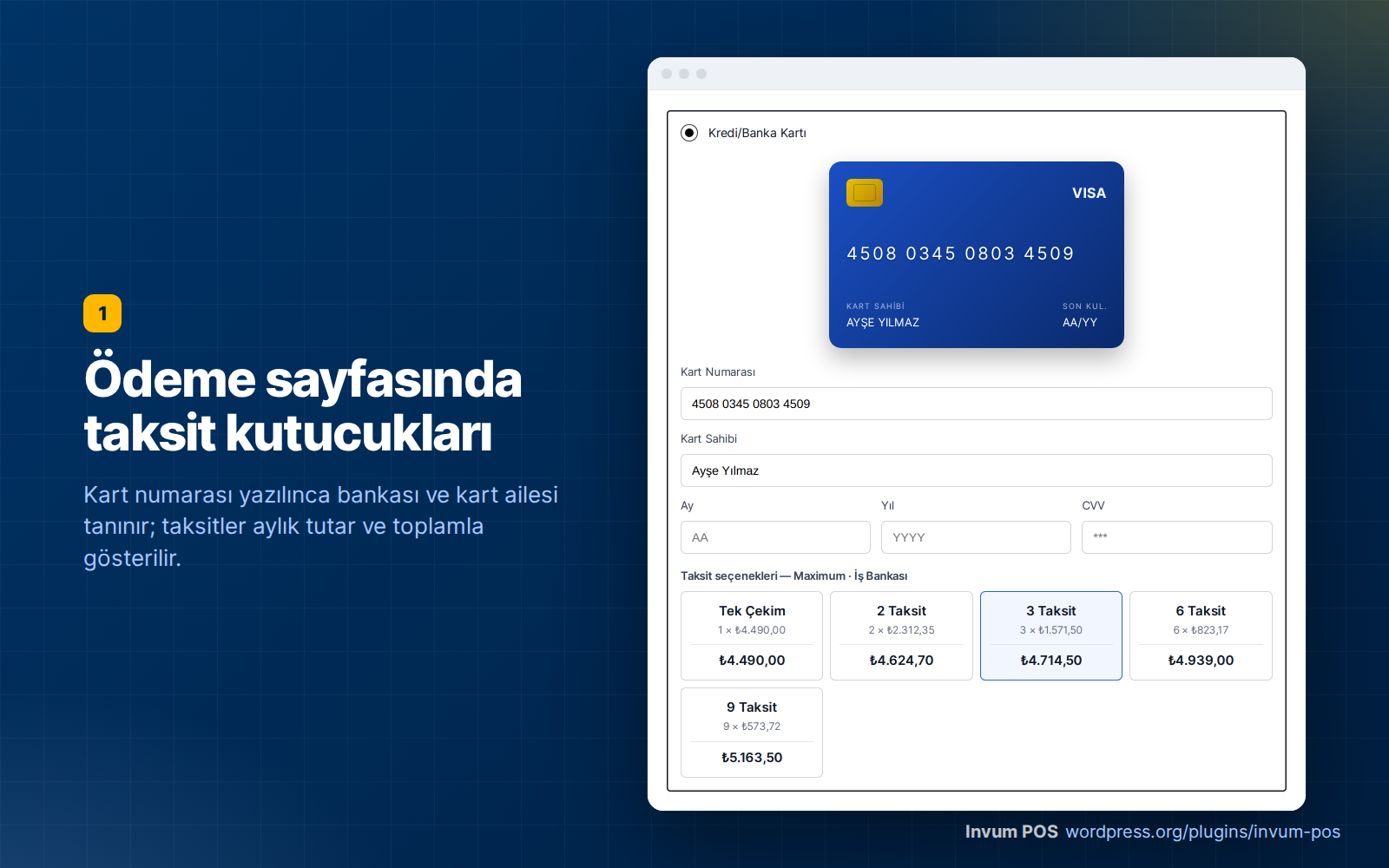
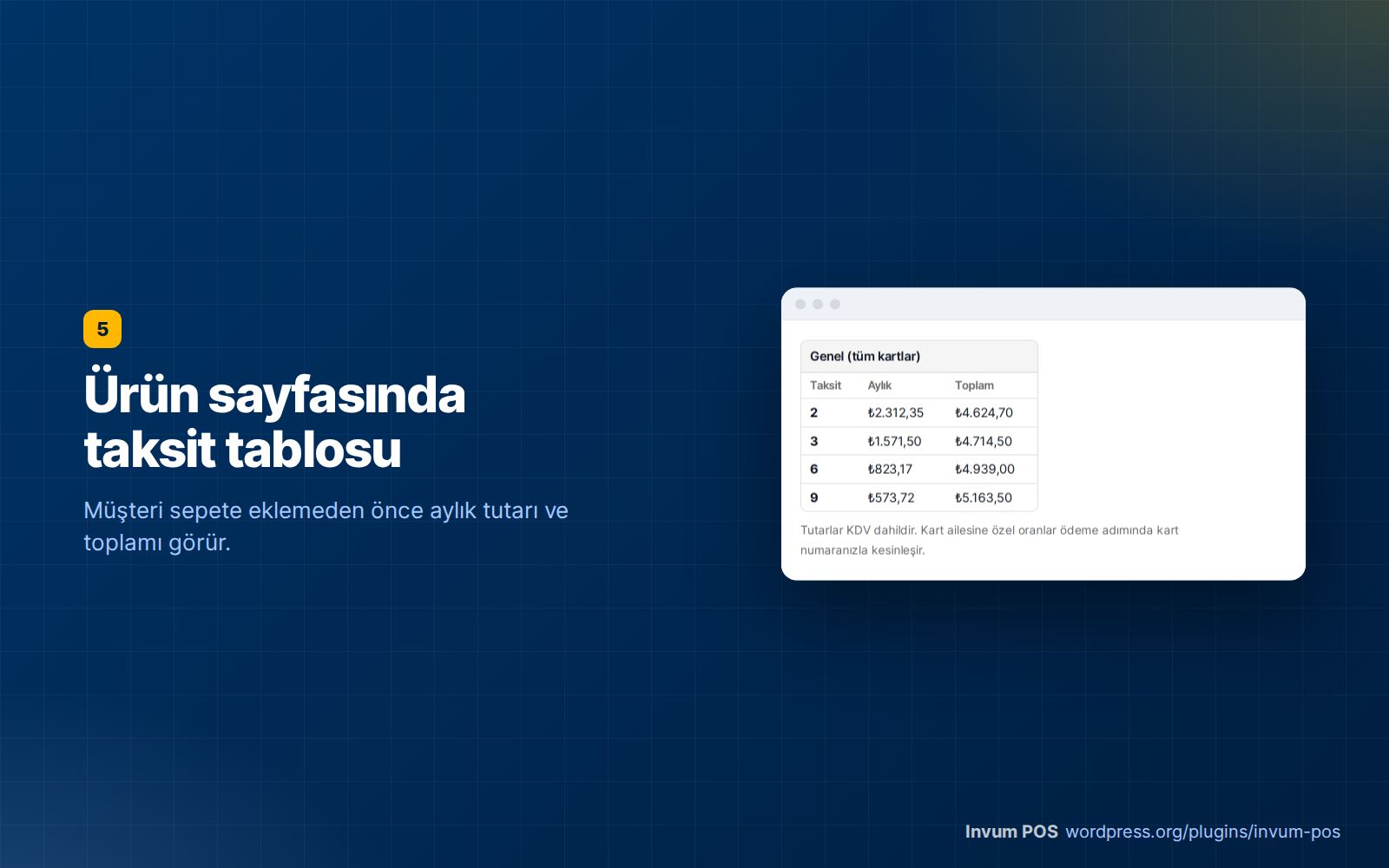
- 📆 Installments — Boxes on the checkout page showing the number of installments, the monthly amount and the total. Installment table on the product page. Separate rates per card family (Bonus, World, Axess, Maximum, CardFinans, Paraf…); pass the interest on to the customer or protect your net amount.
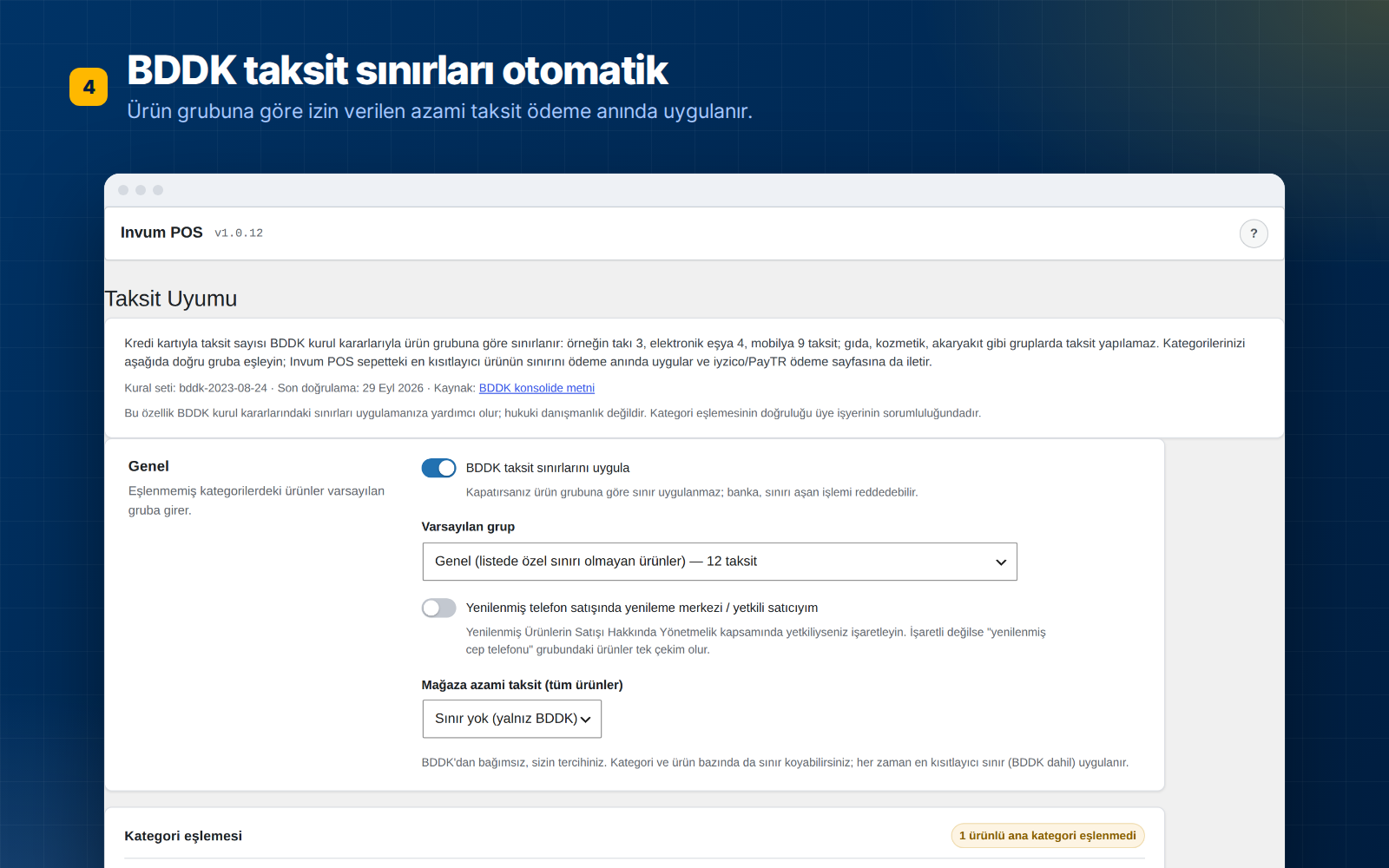
- ⚖️ BDDK installment limits — The maximum number of installments allowed for each product group is applied automatically; no installments are offered on debit, prepaid and foreign cards.
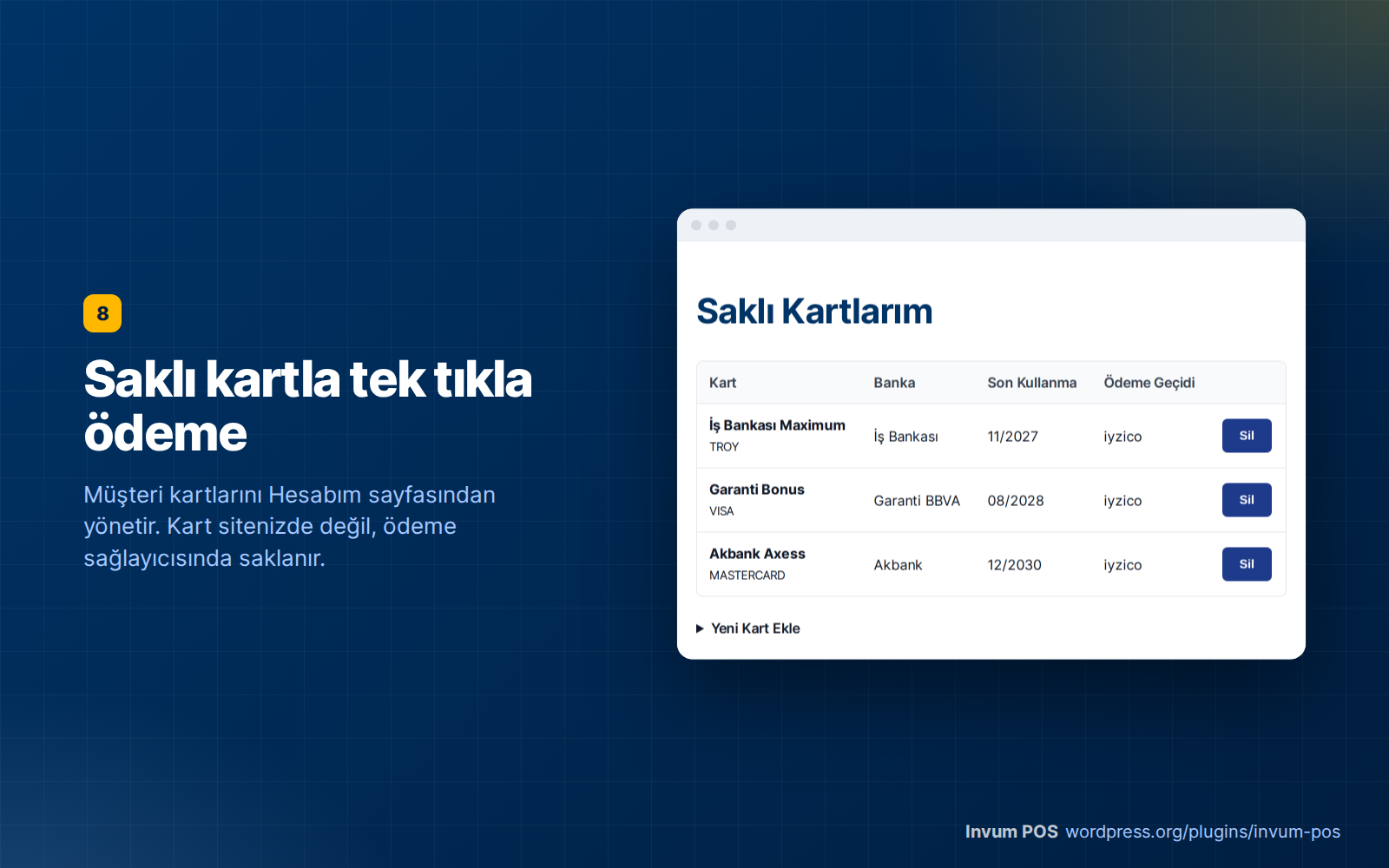
- ⚡ One-click payment with saved cards — The customer saves the card once and pays with one click on later purchases. Card data is stored at the payment provider, not on your server.
- 🔁 Subscriptions — Recurring payments with WooCommerce Subscriptions, including cancellation, suspension and card change flows.
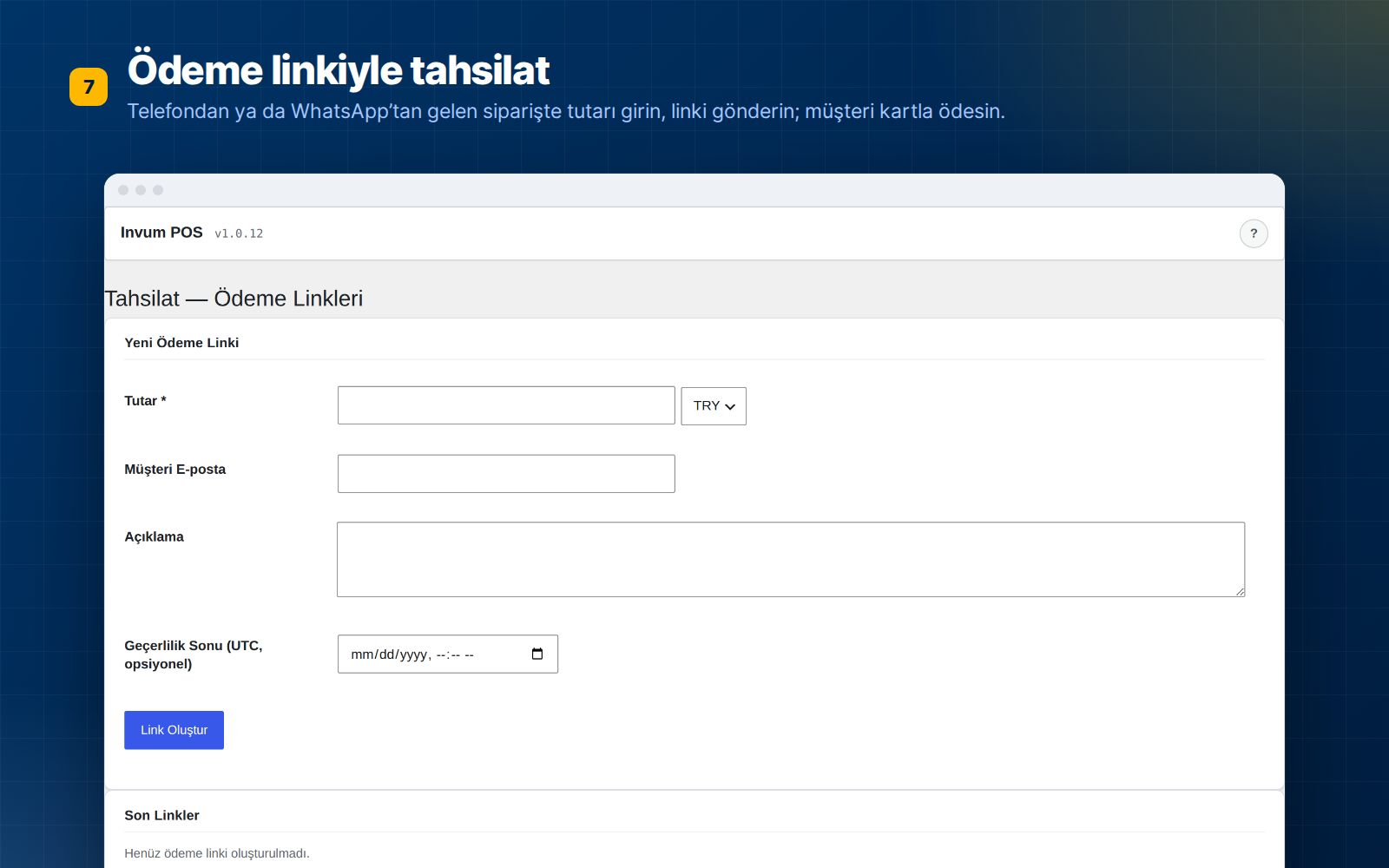
- 🔗 Payment links — For stores taking orders by phone or WhatsApp: enter the amount, send the link, the customer pays by card.
- 🧾 Turkish decline codes — Clear messages such as “Insufficient card limit” or “The bank declined the transaction”; both you and your customer see what went wrong.
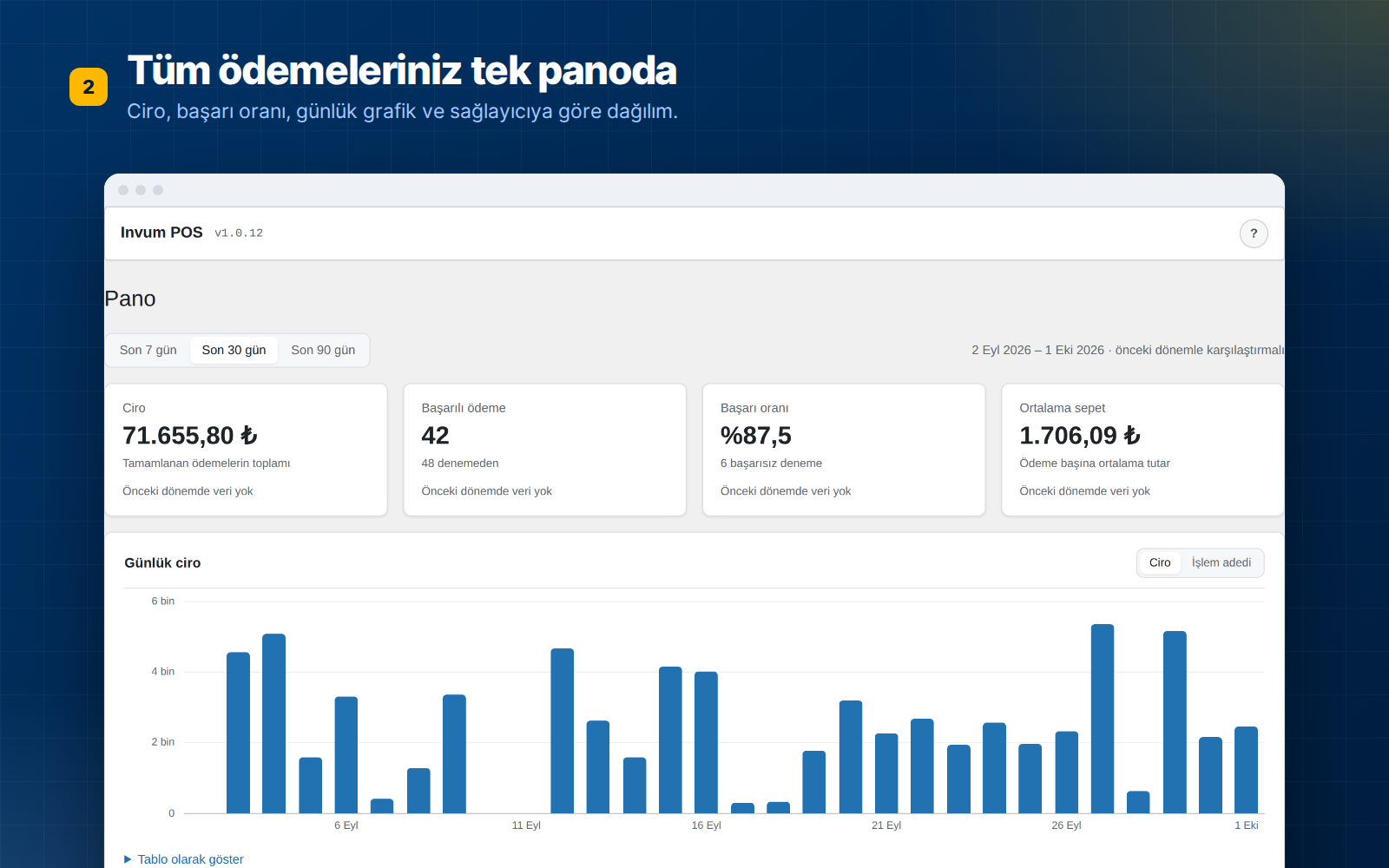
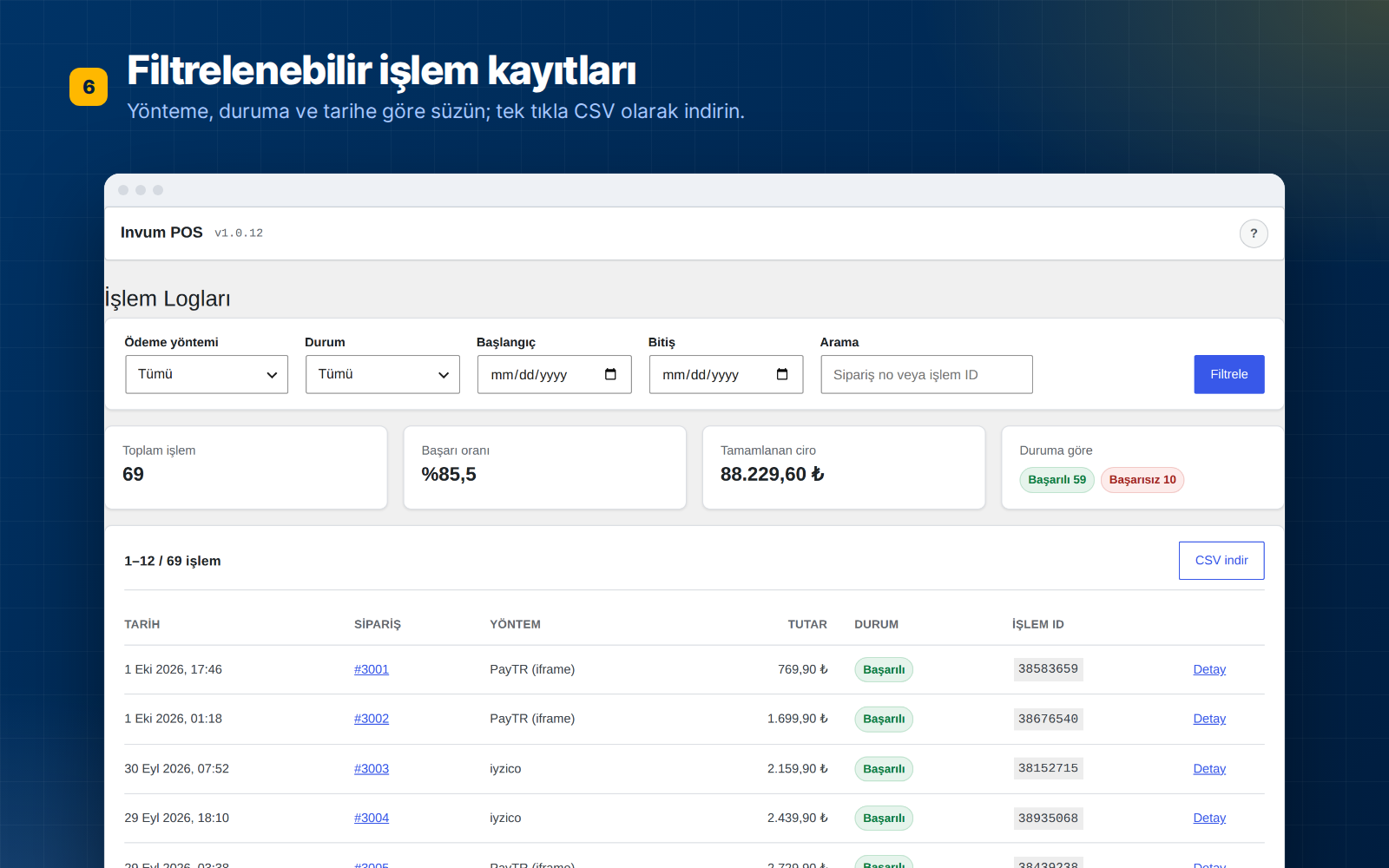
- 📊 Dashboard and transaction logs — Success rate, weekly comparison, most used methods, filterable transaction history and CSV export.
- 🎨 Card form with live preview — On both the WooCommerce Blocks and the classic checkout, a card visual that comes alive as the card number is typed.
- ↩️ Refunds — Full or partial refunds through the provider with the “Refund” button on the WooCommerce order screen.
🚀 Five-minute setup
- Install and activate the plugin.
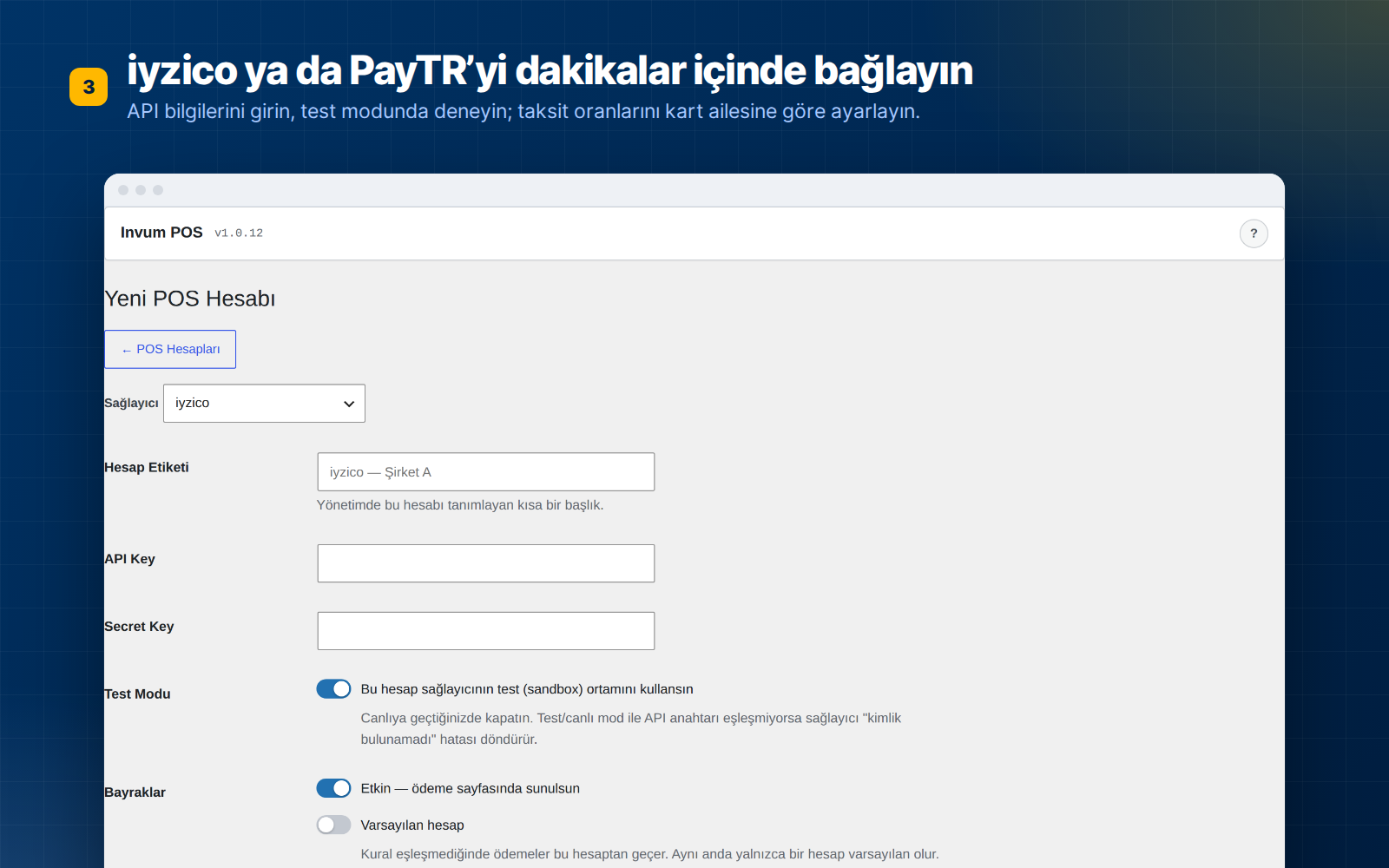
- On the Invum POS › POS Accounts screen, choose iyzico or PayTR and enter your API credentials.
- Try it in test mode first; if everything works, turn test mode off. That’s it.
Step-by-step guides (in Turkish): iyzico setup · PayTR setup · iyzico or PayTR?
🏦 Moving to your bank’s virtual POS?
When you want a direct bank virtual POS — to lower commission or to use your bank’s installment campaigns — you install a separate plugin, Invum POS Pro, next to this one. Your settings, saved cards and transaction history stay as they are.
- Pro — every bank and provider: 12 banks on the NestPay infrastructure (Akbank, İş Bankası, Ziraat Bankası, Halkbank, QNB, TEB, ING, Şekerbank, Türkiye Finans, Anadolubank, Alternatif Bank, Cardplus), Garanti BBVA, Yapı Kredi (Posnet), VakıfBank, Craftgate and Moka. Payment routing rules by category, cart and bank.
- Studio — advanced rules by card BIN and installment count; Paid Memberships Pro and GiveWP bridges.
- Agency — 5 live + 5 test sites; moving a rule set from one store to another; delivering the plugin under your own brand name (white label).
The code of the Pro plugin is not included in this free plugin. Plans and pricing: invum.com.tr/pos
🛡️ Security
- API keys are stored encrypted (AES-256) in the database; they are never kept as plain text anywhere.
- Card number and CVV are never written to logs under any circumstances.
- With the iyzico Checkout Form and PayTR iFrame, card data never touches your site (PCI DSS SAQ A). If you choose the on-site card form (Direct API), card data passes through your server to the provider; your PCI scope is then SAQ D.
- When you delete the plugin, your POS accounts and transaction history are kept by default.
Trademarks
iyzico, PayTR, Param, Garanti BBVA, Yapı Kredi, Posnet, VakıfBank, PayFlex, NestPay, Craftgate, Moka and the bank names listed above are trademarks of their respective owners. Invum is an independent product; it is not affiliated with, endorsed or sponsored by any of these companies. The names are used only to identify the payment services this plugin connects to.
External services
This plugin relies on the third-party services documented below. Payment gateways and the license API are contacted only when you enable and configure them; the only service refreshed automatically is the CBRT exchange rate feed (details below).
Payment gateways (iyzico and PayTR in the Lite version; additional providers are added by the separate Invum POS Pro plugin). When a customer pays with a gateway you have enabled, the plugin sends the data needed to process that payment — order amount and currency, order/transaction IDs, and the card or 3-D Secure data entered by the customer — to that provider’s API together with the merchant credentials you configured. This happens during checkout and when the provider sends back the 3-D Secure / payment result. Card data is never stored as plain text or written to logs. Each provider is operated independently; please review their terms of use and privacy policy:
- iyzico — Terms: https://www.iyzico.com/kendim-icin/kullanici-sozlesmesi — Privacy: https://www.iyzico.com/gizlilik-politikasi
- PayTR — Terms: https://www.paytr.com/kosullar — Privacy: https://www.paytr.com/gizlilik
CBRT exchange rate feed (www.tcmb.gov.tr). A scheduled task fetches the official daily exchange rates published by the Central Bank of the Republic of Türkiye once a day from https://www.tcmb.gov.tr/kurlar/today.xml and shows them on the exchange rate card in the plugin’s admin panel. This is a plain GET request for a public XML document — no personal data, order data or site information is transmitted. Terms/usage: https://www.tcmb.gov.tr/
Invum License API (panel.invum.com.tr). If you enter a Pro, Studio or Agency license key, the plugin contacts the Invum panel to activate, verify or deactivate that key and to receive Pro module updates. It transmits your license key and your site address (URL). The free Lite version requires no license and makes no calls to this service unless you enter a key. Terms: https://invum.com.tr/ — Privacy: https://invum.com.tr/gizlilik-politikasi/
Screenshots
Installation
Automatic installation (recommended)
- In your WordPress dashboard go to Plugins › Add New.
- Search for Invum POS, click Install Now and then Activate.
- In the left menu open Invum POS › POS Accounts › New POS Account: choose iyzico or PayTR and enter your API credentials.
- Place a test order while Test mode is on. If everything works, turn test mode off and go live.
Manual installation
- Download the zip file with the Download button on this page.
- Upload and activate it via Plugins › Add New › Upload Plugin.
Where do I find my API credentials?
- iyzico: The API Key and Secret Key in the API keys section of your panel. For testing you can open a free test account at sandbox-merchant.iyzipay.com.
- PayTR: The Merchant ID, Merchant Key and Merchant Salt in the API information section of your store panel.
Guides with screenshots (in Turkish): iyzico setup guide · PayTR setup guide
FAQ
-
Is it really free? Is there a limit?
-
Yes. You can use it with iyzico and PayTR on an unlimited number of sites with unlimited transactions. There is no license key, trial period or per-transaction fee. You pay nothing beyond your payment provider’s own commission.
-
Which versions are required?
-
PHP 8.1+, WordPress 6.6+, WooCommerce 9.0+. Your site must run over HTTPS (SSL) for 3D Secure returns.
-
How do installments work?
-
When the customer types the card number, the card’s bank and family (Bonus, World, Axess…) are recognized and the installments available for that card are shown as boxes on the checkout page. You can pass the interest on to the customer or have it calculated so that your cash amount is protected. The maximum installment limit set by BDDK for each product group is applied automatically.
-
Is card data stored on my site?
-
No. With saved cards, the card is stored in your payment provider’s (iyzico/PayTR) vault; only a token is kept on your site. Card number and CVV are never written to logs under any circumstances. Your API keys are stored encrypted in the database.
-
Is it compatible with WooCommerce Blocks (the new checkout)?
-
Yes. It works on both the Blocks-based checkout and the classic shortcode checkout.
-
Does it work with WooCommerce Subscriptions?
-
Yes. With iyzico and PayTR Direct, recurring payments are charged automatically from the saved card; cancellation, suspension, reactivation and payment method change are supported.
-
Can I connect my bank’s virtual POS?
-
The free version works with iyzico and PayTR. The virtual POS of Akbank, İş Bankası, Garanti BBVA, Yapı Kredi, VakıfBank, Ziraat and other banks, Craftgate and Moka require the separate Invum POS Pro plugin: invum.com.tr/pos. When you move to Pro, your settings and transaction history are kept.
-
Will I lose my data if I delete the plugin?
-
No, your POS accounts and transaction history are kept by default. If you want to delete everything, turn off the “Keep data when the plugin is deleted” option under Invum POS › Settings.
-
How do I get support? What if a feature I need is missing?
-
Write to the support forum; questions and feature requests are answered there.
-
Is it GPL compatible?
-
Yes, it is licensed under GPL-2.0-or-later; you can review and modify its source code.
Reviews
There are no reviews for this plugin.
Contributors & Developers
“Invum POS Entegratör – Sanal POS ve Taksitli Ödeme” is open source software. The following people have contributed to this plugin.
Contributors
“Invum POS Entegratör – Sanal POS ve Taksitli Ödeme” has been translated into 1 locale. Thank you to the translators for their contributions.
Translate “Invum POS Entegratör – Sanal POS ve Taksitli Ödeme” into your language.
Interested in development?
Browse the code, check out the SVN repository, or subscribe to the development log by RSS.
Changelog
1.0.32
- Fix: WooCommerce Subscriptions — the card a subscription is bought with (a saved card, or the card saved during that payment) is now attached to the subscription. Before, the first automatic renewal could not find a saved card unless the customer changed the payment method by hand.
- Fix: PayTR Direct — a card saved during payment is now stored on stores that use only a PayTR Direct account; for subscription orders the card is saved even if the “save card” box is not ticked.
- Fix: Subscription renewals (WooCommerce Subscriptions and the membership, donation and course bridges) no longer fail with “No adapter resolved” when the provider is not the store’s default account; a renewal is charged on the subscription’s own payment method and POS account.
- Fix: PayTR Direct subscription renewals were sent to the PayTR iFrame integration, which cannot charge a saved card, and always failed; they are now charged through PayTR Direct.
1.0.31
- Security: Card-testing protection, the installment lookup limit and the payment provider call budget now count requests sent at the same time correctly; parallel requests could previously slip past the limits.
- Security: Card-testing protection counts a logged-in customer’s attempts on their account instead of the billing email, so someone typing that customer’s email at checkout can no longer block them.
- Fix: With several accounts for the same provider, the background job now checks an open 3D Secure payment on the account the order was charged with (PayTR, iyzico, VakıfBank, Craftgate, NestPay banks).
- Fix: Pending orders of other payment methods no longer push this plugin’s orders out of the background job’s batch.
1.0.30
- Improvement (paid plans): Garanti BBVA and Moka payments whose customer closed the 3D Secure page are now checked with the bank by the background job; an order the bank has charged is marked paid and can be refunded from the plugin.
- Fix: Orders placed through the main “Invum POS” payment method were never checked by the background job for payments left open on the 3D Secure page.
- Fix: The background job and a late bank callback could settle the same order at the same time; they now take turns, and the job re-reads the order before changing it.
- Fix: An order whose earlier payment attempt was already closed by the bank callback is no longer re-checked using that attempt, and orders paid through the main payment method are never cancelled by the background job.
- Improvement: A PayTR payment confirmed by the background job is now refundable from the plugin, and is accepted only when nothing was refunded and the amount matches the order.
1.0.29
- Change (paid plans): Every bank and provider (Garanti BBVA, Yapı Kredi Posnet, VakıfBank, Craftgate and Moka, alongside the 12 NestPay banks) now opens on the Pro plan. Studio and Agency keep their advanced rules, bridges, extra sites and white label.
- Improvement: The bank list on the Dashboard upgrade card is worded as a question and notes that it does not change your plugin settings.
1.0.28
- Improvement: On sites without a license, the Dashboard upgrade card now asks for your bank and shows the plan that supports it, its yearly price (VAT included) and a direct link to the order page, together with the refund terms.
- Improvement: 34 Turkish interface strings that still contained English words (endpoint, credential, gateway) were translated.
- Fix: The “Learn about Invum POS Pro” link on the new POS account screen pointed to a page that no longer exists; it now opens the plan comparison.
1.0.27
- New: A “▶ Watch the video guide for this screen” link in the header of the screens (Dashboard, POS Accounts, Transaction Logs, Payment Links, Installment Compliance, Installment Display, Smart Rules and Simulator). Hidden on white-label sites.
- Improvement: The plugin’s Documentation page lists the current guides and error pages (VakıfBank, PCI merchant guide, new error code pages); the retired Param was removed from the list.
1.0.26
- Fix: In the Payment Links list the status was shown raw as “pending”, “paid”; it now reads Pending, Paid, Expired, Cancelled.
- Fix: Under the product lines on the order screen the plugin’s internal records (BDDK product group, store installment limit) were shown with raw key names; they are now hidden. The records were not deleted and remain as an audit trail.
1.0.25
- Critical fix (full version only, Moka): When Moka became “Moka United” its server addresses changed; the plugin was calling the old addresses. The order field in the 3D return was also read with the wrong name and successful payments could be marked “failed”. Payment, failed payment and refund were verified end to end with a real test account in the Moka United test environment.
- Fix (full version only, Moka): “Test Connection” calls the right endpoint; a wrong password and a missing server IP permission are reported with separate messages.
- Fix (full version only, Garanti BBVA): Every payment attempt goes to the bank with its own order number. When a customer whose card was declined tried to pay the same order again, Garanti rejected it with “Only one sale is allowed within the same order”. Refunds and voids use this number; older orders are not affected.
1.0.24
- Security: Adding, editing and deleting POS accounts and testing their connection are now open only to site administrators by default. Shop Manager accounts can see them but cannot enter keys; transaction logs, payment links and reports stay available to Shop Managers. If you deliberately want the old behavior:
add_filter( 'invum_pos_manage_accounts_capability', fn() => 'manage_woocommerce' ); - Fix (full version only): “Multi-account routing” was wrongly shown as locked to the Agency plan on the Features page; the feature already worked on Pro and higher plans.
- New: If the plugin has been useful, a WordPress.org review is requested once on the plugin’s own pages after at least 10 successful payments and 14 days; it can be dismissed with “Later” or “Don’t ask again”. Never shown on white-label sites.
- Improvement: The plugin’s display name is now “Invum POS Entegratör – Sanal POS ve Taksitli Ödeme”.
- Fix: Direct-access protection in one plugin file was moved to where the WordPress.org check looks for it.
1.0.23
- Fix: PayTR saved-card payments and WooCommerce Subscriptions renewal charges were sent with an order number format PayTR does not accept (with underscores); the charges were rejected before reaching the bank. The order number now contains only letters and digits as PayTR requires.
- Security: Saved-card tokens returned in payment provider responses (iyzico cardToken / cardUserKey, PayTR utoken and similar) are now written to transaction logs masked; existing records are masked once on update. Masking also catches card numbers with spaces/dashes and card fields in XML / form bodies; log messages are masked too.
- Security: Two payment notifications arriving at the same time for the same order are now reliably merged into a single transaction (the database lock is truly atomic).
- Security: In the CSV export of transaction logs, values starting with “=”, “+”, “-“, “@” are not executed as Excel formulas.
- Security: Live calls from the installment and BIN lookup endpoints to the payment provider are bound to a site-wide per-minute budget; empty responses are also cached briefly. When the budget is used up the customer only sees a single payment, checkout does not break (
invum_pos_upstream_budget_per_minutefilter). - Fix: A payment link counts as “paid” only if the order carries a line for the link’s amount and is not cash on delivery.
- Fix: When changing a subscription’s payment method, the selected saved card is verified to belong to the subscriber.
- Fix: Leading/trailing spaces in API keys are trimmed on the POS account form (signature errors caused by copy-paste).
- Security fix (full version only): The VakıfBank 3D Secure return was processed even without the verification ID sent by the bank; the ID is now required and must match the order’s record.
- Fix (full version only): The “translation loaded too early” notice logged on every request on WordPress 6.7 and later was resolved.