

Description
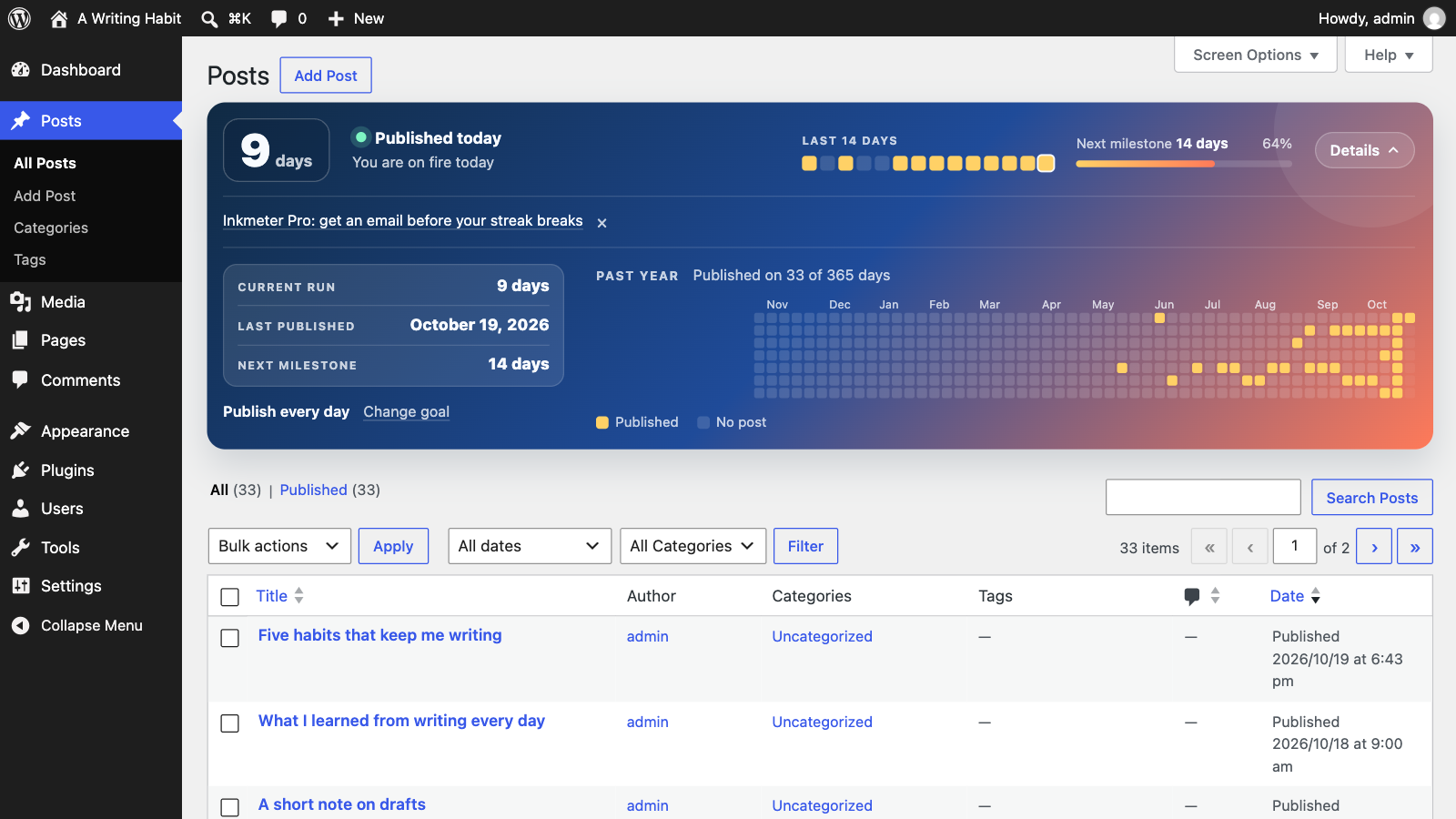
Inkmeter turns publishing into a habit. Open Posts in your dashboard and a compact panel shows your current streak, whether you have already published today or still need to post to keep it going, your last 14 days and the progress to the next milestone: 3, 7, 14, 30, 50 and 100 days, then every 25 days.
Click Details in the panel for more, and it stays open until you close it:
- Current run: how many days in a row you have published at least one post.
- Last published: the date of your latest post.
- Next milestone: the next streak length to reach.
- History: a calendar of the past year, with the days you published.
A streak stays alive until the end of the day after your last post, so you always have a full day to keep it going. Days follow your site’s timezone, and several posts on the same day count as one day.
Daily or weekly goals
Not everyone publishes every day. Under Details Change goal in the panel, an administrator can pick a goal for the site: publish every day, or on 1 to 6 days a week. With a weekly goal, the streak counts weeks in a row that met it, the panel shows how many days this week had a post, and the current week keeps the streak alive until it ends. Weeks start on the day set in Settings General Week Starts On.
Counting drafts
Writing doesn’t always end in a published post the same day. Under Change goal, an administrator can also choose to count days spent working on a draft: any day you save changes to a post that isn’t published yet counts like a day you published. It’s off unless you turn it on, and the panel then says “wrote” instead of “published”. Opening the editor without saving doesn’t count.
There is nothing else to configure. The panel only appears on the Posts list screen, each user can hide it under Screen Options, and the plugin loads nothing on the front end of your site.
Inkmeter Pro (optional)
Connect your site to Inkmeter Pro under Settings Inkmeter to get an email at the hour you choose when your goal needs a post today, before your streak breaks, and 2 streak freezes a month: miss a day (or a week, with a weekly goal) without losing your streak. The history calendar includes all your connected sites and the history your account keeps, and a weekly email recaps the days you wrote. Your streak history is kept in your account, so it survives reinstalls and site moves, and several sites can share one streak.
Inkmeter Pro is a paid subscription, monthly or yearly, that starts with a 14-day free trial. Everything above works without it, and nothing is sent anywhere unless you connect.
Translations
Inkmeter is ready to be translated into any language. You can help translate it on translate.wordpress.org.
Privacy
Without Inkmeter Pro, Inkmeter does not collect, store or send any personal data. It reads the dates of your published posts and caches the result in a transient, which is removed when you delete the plugin. If you hide the panel, that choice is saved in WordPress’ own per-user screen settings.
If you connect to Inkmeter Pro, the data described under External services is sent to the Inkmeter Pro service. Disconnecting stops it, and deleting the plugin removes the connection from your site.
External services
Inkmeter Pro, which is optional, uses a web service at inkmeter.com, run by Dmitrii Merkushin. Nothing is sent to it unless an administrator connects the site under Settings Inkmeter.
- When connecting: your browser opens inkmeter.com, where you enter your email address; the plugin then sends this site’s address and timezone to api.inkmeter.com.
- After connecting: a minute after posts or the writing goal change, and once a day, the plugin sends api.inkmeter.com the dates on which this site published at least one post (and, if you count drafts, the dates you worked on one), its timezone, its writing goal and the first day of its week. It never sends your posts’ titles, content or any other details about them.
- When you open Settings Inkmeter, change reminders, upgrade or manage your subscription: the plugin asks api.inkmeter.com for your plan, reminder settings, streak, the plans on offer, and checkout or billing links. Payments happen on Lemon Squeezy, the service’s reseller.
- When you disconnect or delete the plugin: the plugin tells api.inkmeter.com to revoke this site’s access.
The service’s Terms of service and Privacy policy.
Source code
Development happens on GitHub, including the uncompiled CSS and JavaScript and the build instructions. Bug reports and pull requests are welcome.
Screenshots
Installation
- In your dashboard, go to Plugins Add New Plugin and search for “Inkmeter”, or upload the plugin zip.
- Activate the plugin.
- Go to Posts to see your streak.
FAQ
-
What counts as a day?
-
A calendar day in your site’s timezone (Settings General Timezone) on which at least one post was published.
-
Can I publish less often than every day?
-
Yes. Choose a weekly goal, from 1 to 6 days a week, under Details Change goal in the panel. Several posts on the same day still count as one day, so a goal of 3 days a week asks you to publish on 3 different days.
-
Do scheduled, draft or private posts count?
-
By default, only published posts count, and a scheduled post counts on the day it is published. If you turn on counting drafts under Change goal, the days you save changes to a draft, pending or scheduled post count too. Private posts never count.
-
Do pages or custom post types count?
-
No, only regular posts.
-
I published yesterday but not today. Is my streak lost?
-
No. The streak stays alive until the end of today. Publish a post today to extend it. With a weekly goal, the streak stays alive until the end of the current week.
-
Who can see the panel?
-
Anyone who can open the Posts list in the dashboard.
-
What does Inkmeter Pro send?
-
Only this site’s address, its timezone, your writing goal, the first day of your week and the dates you published on (plus the dates you worked on drafts, if you count them), so it can tell whether your goal needs a post today. Never your posts or anything about them. See External services above.
-
Can I hide the panel?
-
Yes. On the Posts screen, open Screen Options at the top right and uncheck Writing streak panel. The choice is saved for your user only; check the box again to bring the panel back.
Reviews
There are no reviews for this plugin.
Contributors & Developers
“Inkmeter” is open source software. The following people have contributed to this plugin.
Contributors
Translate “Inkmeter” into your language.
Interested in development?
Browse the code, check out the SVN repository, or subscribe to the development log by RSS.
Changelog
1.1.0
- Changed: a compact panel. One row shows the streak, today’s status, the last 14 days and the next milestone; Details opens the rest.
- New: optional Inkmeter Pro under Settings Inkmeter: an email reminder before your streak breaks, and streak history kept in your account.
1.0.0
- Initial release.